
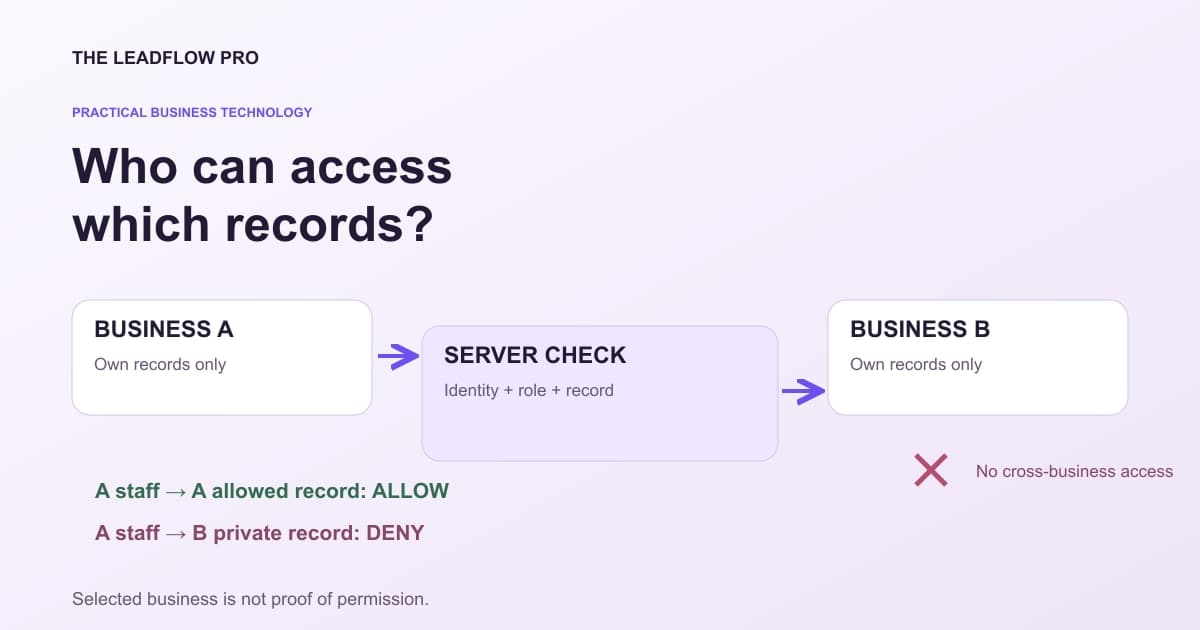
A business assistant should not be able to read another company's estimate because someone changed a number in a request.
That boundary belongs in the application and its data access rules. A friendly prompt saying "use only my records" is not an authorization system.
Before connecting a proposed AI interface to private business records, ask for a small permission demonstration using fictional accounts. You do not need real customer data to discover whether the design checks the right things.
Separate identity, business and operation
There are three different questions:
- Who is making this request?
- Which business and records can that identity access?
- What operation is permitted on those records now?
A person may work with two businesses and hold different roles in each. A service connection may be allowed to read a narrow field set but not export the whole database. An expired connection should not keep working because an old background job remembers its identifier.
OWASP recommends establishing tenant context from a server-verified identity and current authorization. A caller-supplied business identifier can select a context, but cannot prove access to it. OWASP multi-tenant guidance
In plain terms, choosing "Business B" in a request must not turn a Business A account into a Business B account.
Write the permission matrix before the demo
Use two fictional businesses, A and B, with three roles: owner, staff and external assistant connection. Start with four operations: read, draft, send and export.
That creates 2 × 3 × 4 = 24 illustrative role-operation cases before you add cross-business attempts, individual record ownership, revoked access and field restrictions. It is a starting test inventory, not proof of comprehensive security.
Copy this worksheet:
PERMISSION CASE
Authenticated role:
Authorized business:
Selected business:
Record belongs to:
Requested operation: read / draft / send / export
Allowed fields:
Expected result: allow / deny / approval required
Required human approval:
Expected audit receipt:
What must NOT appear in response or logs:
Actual result and evidence:
Retest after access revoked:

BASELINE EXAMPLES
A staff -> A public service list        allow if policy permits
A staff -> B private estimate           deny
A assistant -> A approved draft fields  allow within scope
A assistant -> send that draft          require separate authority
Revoked A connection -> queued export   deny at execution time
Unauthenticated -> private record       deny
Use the actual role names and operations in your system. A label called "staff" does not tell you which permissions it really has.
Test the boundary on every access path
Showing that a dashboard hides Business B is not enough. Test the underlying request through the same application role and connection path used in production.
Ask what happens when the record identifier changes, a download URL is reused, a background task runs later or a cached response is returned. The data query may be correctly scoped while an export or cached answer is not.
OWASP's authorization guidance calls for denying by default and checking permission on every request. A successful sign-in is not a permanent grant to every object or action. OWASP authorization guidance
For higher-consequence actions, also check the current state. Permission to draft a quote does not establish permission to send it, change its price or charge a customer.
Keep model instructions out of the authority chain
A retrieved document or customer message may contain a sentence telling the assistant to ignore the business boundary. That text is content, not permission.
The server should accept only supported operations and validate their inputs. The model should not receive a broad administrator credential and be trusted to remember every access rule.
For a proposed chat-client connection, write down what the client supplies, what the server verifies and what the user must approve. Compatibility with a protocol does not establish that every client or account supports the same confirmation behavior.
This guide describes a design and acceptance process. It does not claim that a LeadFlow private-record plugin for ChatGPT, Claude or Grok is already available or connected to your accounts.
Include revocation and recovery
A useful test ends by removing the fictional assistant's access. Confirm that new requests fail and that previously queued work cannot run under stale permission.
Decide what records must be retained for accountability and which temporary copies must expire. Keep logs useful without collecting complete private documents, access tokens or unnecessary customer details.
Also ask how a mistaken action can be stopped or corrected. "We can disconnect it" does not reverse a message already sent or an export already downloaded.
Estimate work after the boundary is clear
The calculator below compares a labor scenario with a scoped system and a proportional human remainder. It cannot decide whether the work is safe to automate or whether a position can be removed.
If testing shows that only a draft can be automated, enter that limited coverage. Keep review, exception handling, maintenance and training in the cost discussion.
Compare the cost of a bounded task, including the human remainder
Use this planning model after defining what the system is permitted and able to do. An entered coverage percentage is an assumption, not demonstrated capability.
What to score
Your score
Based on your inputs and any starting examples. This calculation does not fetch live rates or market benchmarks.
The scenario retains a substantial human-work remainder. Check whether the work and staffing can actually be divided this way.
Coverage is an assumption, not measured capability. The model reduces labor cost proportionally, which may not match staffing reality. Include supervision, transition, failures and maintenance; it does not establish that a role can be eliminated.
What this assumed
- Assumes the system covers the share of the work you enter, and that the rest still needs a person.
Calculations run in your browser. Choosing Email my result saves an excerpt and your contact details with The LeadFlow Pro so we can email it to you.
How to run it, step by step
- 1Price the actual scope. Enter Loaded cost of the hire per year for the work being compared. Do not assume a partial automation replaces a whole position.
- 2Include the ongoing system cost. One-time cost to build the system and System cost per month should reflect testing, monitoring and maintenance within the proposed scope.
- 3Keep human work visible. Percent of the work a system can do reduces modeled labor proportionally. Validate that assumption and budget for approvals, exceptions and supervision.
How to read what it gives you
- The model does not test security, task quality or whether staff costs can actually be reduced.
- A read-only assistant and a system allowed to send messages have different risk and review needs.
- An apparent payback is a scenario before unmodeled transition costs and changes in work.
The tool is free, it does not expire, and you can put it on your own website if you want it there. Nothing on this page is locked.
Not ready to talk? Browse the rest of the free tools
Buy the demonstrated scope
Ask for the matrix, the observed results and the unresolved cases as part of a proposal. "AI integration" is too broad to serve as an acceptance criterion.
Discuss a scoped business automation with LeadFlow. Start with one operation, two fictional business contexts and the permissions that must hold. Expand access only after the implemented boundary and the desired behavior have been verified.
Questions people actually ask
Is a business ID in the request enough to authorize access?
No. The server must verify the caller's identity and permission for that business and operation. A selected identifier is not proof of membership.
Does read-only mean information cannot leak?
No. Reading or exporting the wrong record is itself an exposure. Test ownership, field scope, logs, caches and downloads.
Can a prompt replace API authorization?
No. Instructions about which business to use do not replace server-side checks. The underlying operation must enforce the boundary.
Where these numbers come from
- OWASP: server-verified tenant context and isolation (2026-11-01)
- OWASP: deny by default and validate authorization on every request (2026-11-01)
Our own figures come from the lead records of businesses we run systems for, counted in total and never by name.