
An assistant can answer quickly and still use last year's service area, an expired price or hours from an old flyer.
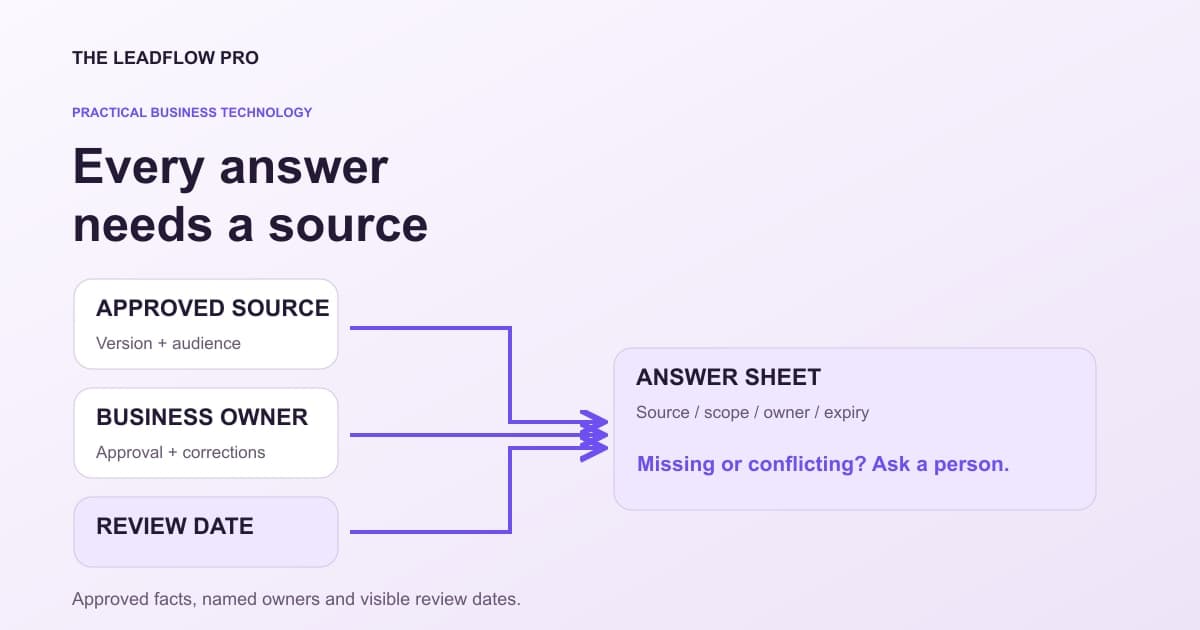
Before buying a larger knowledge platform, make a small answer sheet that tells people where each answer came from, who approved it and when it needs another check.
The point is not to collect every document. It is to make a few important answers dependable enough to use. This is a preparation workflow, not a claim that a private LeadFlow knowledge assistant is already connected to your business.
Start with decisions customers actually make
Choose ten questions that affect whether someone contacts, visits or buys from the business. Hours, service availability, booking requirements, what a quote includes and how to request help are useful starting points.
Do not begin by uploading an entire shared drive. That mixes drafts, old versions, private information and conflicting authority before you have decided what belongs in an answer.
Write each question in the customer's language. "Can you come to this town?" is easier to test than a heading called "Territory policy." Then identify the record authorized to answer it.
Give every fact a home and an owner
A public webpage can be an approved source for public hours. An unapproved staff chat should not silently override it. If the two conflict, record the conflict and ask the responsible owner rather than asking an AI system to choose the more confident sentence.
Use this copyable sheet. Keep the private source location inside the business; only publish sources that are intended to be public.
BUSINESS ANSWER RECORD
Question:
Approved short answer:
What this answer does not cover:
Source record and version:
Public source URL, if appropriate:
Person responsible for approval:
Checked on:
Review by / expiry:
Applies to location or service:
Allowed audience:
Conflicting or superseded sources:
If missing, expired or conflicting, say:
Action requiring a person:
Where corrections are recorded:
"Allowed audience" matters. A staff discount rule is not automatically a public offer. A private customer exception is not the general policy. Keep those records in separate permission scopes.
Test a conflict before a normal answer
Consider this illustrative fictional example:
A shop's approved booking page says new equipment inspections start at $120. An old PDF says $95. A draft promotion says $75 but has not been approved.
The correct answer is not the lowest number or the newest file timestamp. The sheet should name the approved source, identify what "starts at" excludes and flag the old PDF for correction.
If approval cannot be established, a useful answer is: "I cannot confirm the current inspection price from the approved information. Please request a quote." That is better than turning a draft into a promise.
Test at least one missing price, one conflicting location, one holiday exception and one question outside the service scope. Record the expected refusal or handoff alongside the normal answer.
Count facts, not just files
Suppose ten questions each have three relevant facts: the answer, an exception and the next step. That is 30 illustrative fact checks.
If six are expired and three of the remaining checks conflict, only 21 are currently clear. Calling the system "trained on all ten FAQs" hides the unresolved nine checks.
This count is an internal review aid, not a scientific accuracy score. One incorrect emergency contact may matter more than several minor wording gaps. Prioritize consequences as well as totals.
If you add retrieval, carry the source controls with it
A retrieval system searches selected material and supplies it to a model. Finding a passage does not make that passage approved or safe to follow as an instruction.
OWASP's retrieval guidance addresses document provenance, permission metadata and source attribution. It also warns that deleting or withdrawing a source needs to propagate to derived indexes and caches. A removed PDF can otherwise remain available through an old searchable copy. OWASP RAG security guidance
For a proposed build, ask how source versions, audience restrictions, expired facts and corrections survive ingestion. Ask for an answer with a traceable source and a demonstration that a withdrawn fact stops appearing.
A more polished response is not evidence that those controls exist. Test them against the actual implemented system before giving it customer-facing authority.
Keep public business facts consistent
Review the public website and business listings against the sheet. Google's guidance asks businesses to represent themselves accurately, including relevant customer-facing hours. Follow its specific rules for the profile rather than stuffing every fact into the business description. Google Business Profile guidelines
The scorecard below can organize your own review. It cannot authenticate a listing, inspect its status or establish search performance.
Review the public facts customers already find
This is a self-assessment from your answers. It does not log into Google, inspect your profile or predict rankings.
What to score
Your score
Details to review
| # | Next action |
|---|---|
| 1 | Claim and verify the business profile using Google's available verification options |
| 2 | Choose the primary category that best describes the business |
| 3 | Check regular and holiday hours so customers know when they can reach you |
| 4 | Make the phone number match your website exactly |
| 5 | Link your website |
| 6 | Invite genuine customers to leave honest reviews without incentives or selecting only happy customers |
| 7 | Review customer feedback and write useful replies without disclosing private customer details |
| 8 | Add useful, real photos of the business, team, and work you can show with permission |
| 9 | Review photos and replace images that no longer represent the business accurately |
| 10 | List every service with a real description |
| 11 | Write a clear, factual business description within the current field limit |
| 12 | Review published updates, offers, and dates; remove information that is no longer accurate |
| 13 | Answer real customer questions clearly on your website; do not depend on a profile Q&A feature being available |
| 14 | Test the phone and website links. If WhatsApp or SMS is available for your profile, add it only when someone can respond |
| 15 | Test the booking link if appointments apply; otherwise mark it not applicable |
| 16 | Use additional categories only when they accurately describe the business |
| 17 | Review supported product or menu features if relevant; otherwise mark them not applicable |
| 18 | Set the service area to the towns you really serve |
| 19 | Set the logo and cover photo |
| 20 | Tag the website link so you can see the traffic it sends |
This score measures the checklist items you confirmed, not Google's ranking system. Local results depend on relevance, distance, and prominence. There is no promised review count, photo count, or posting schedule that guarantees a position or more calls.
What this assumed
- The score is the percentage of this site's checklist items the reader confirms, not a Google inspection, ranking score, or forecast.
- Feature availability varies by business type and region. Review optional items and confirm when they do not apply.
Calculations run in your browser. Choosing Email my result saves an excerpt and your contact details with The LeadFlow Pro so we can email it to you.
How to run it, step by step
- 1Check the actual public profile. Open your own Business Profile separately and verify hours, website, service area and contact details against approved business records.
- 2Mark only verified items. Use the checklist to record what you checked. A selected box is your assertion, not an independent platform test.
- 3Assign the gaps. Give each outdated fact an owner and review date. Keep private customer records out of the public answer sheet.
How to read what it gives you
- A high score does not prove accuracy, eligibility or visibility on Google.
- The same approved facts can inform website FAQs, staff replies and a proposed AI knowledge system.
- Keep platform-specific rules separate from your underlying business facts.
The tool is free, it does not expire, and you can put it on your own website if you want it there. Nothing on this page is locked.
Not ready to talk? Browse the rest of the free tools
Make one correction loop work
Choose a simple change, such as an upcoming holiday closure. Have the authorized owner approve it, update the source sheet, update the intended public destinations and check what a customer actually sees.
Record when each destination was checked. If a proposed assistant uses the source, verify the new answer and the absence of the old one through that assistant too.
That small exercise reveals more than another hundred uploaded files. It establishes who can change an answer and how the change reaches its users.
Discuss a business knowledge workflow with LeadFlow. Bring the questions, approved public sources and the unanswered conflicts. Private retrieval, API permissions and ChatGPT, Claude or Grok connections remain separate implementation and verification decisions.
Questions people actually ask
Do I need a vector database to start?
No. A short, approved source sheet can reveal conflicting facts and missing ownership before you choose a retrieval system.
Does a cited AI answer have to be correct?
A citation helps a person check the source. The source can still be outdated, unauthorized or incorrectly interpreted.
Should customer messages become public FAQs automatically?
No. Extract a general question only through an authorized review. Remove private details and write an approved public answer.
Where these numbers come from
- OWASP: source provenance, permissions and deletion in retrieval systems (2026-11-01)
- Google: accurate Business Profile representation and current hours (2026-11-01)
Our own figures come from the lead records of businesses we run systems for, counted in total and never by name.