
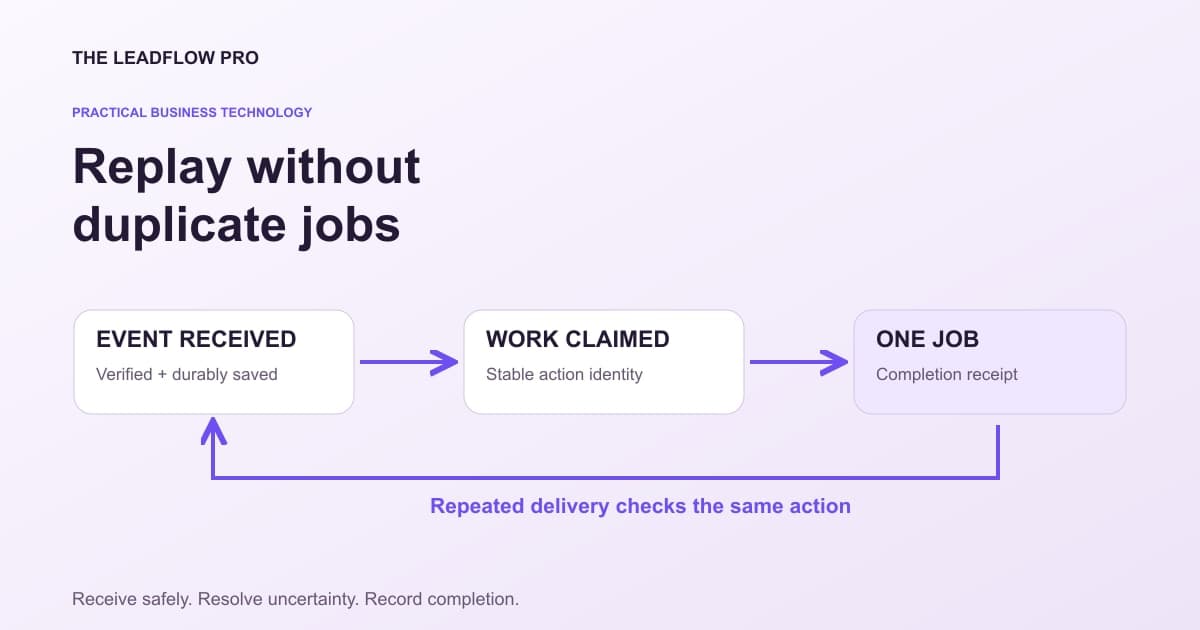
A booking system sends an event. Your job board is slow, so the sender tries again. Now the office sees two jobs and cannot tell which one is real.
The fix starts with a precise promise: one valid business event should produce the intended business action once, even when delivery is repeated. That requires more than a green webhook response.
This guide gives an owner and developer a shared replay worksheet. The examples are illustrative and use fictional systems, not customer records or claims about an installed LeadFlow workflow.
Separate receipt from completed work
A useful handoff has three named states:
- Received: the event passed the required authenticity and input checks and was durably recorded.
- Processing: a worker has claimed the work under the agreed concurrency rules.
- Completed: the destination confirmed the intended action and its receipt was recorded.
Add explicit retryable-failure and needs-review states. Do not use one field called "sent" for all five meanings.
If the destination times out after saving a job, the sender may not know whether the action succeeded. That is an uncertain result, not proof of failure. Before retrying the action, resolve it through the destination's stable request key or an exact receipt lookup.
Give delivery and business action different identities
An event ID answers, "Have we seen this delivery's event before?" A business-action key answers, "Has this particular job creation already happened?"
Those are related questions, but they are not always identical. For example, two event types may both concern the same booking, while one booking can legitimately receive several updates.
Stripe documents that events can arrive out of order and more than once. It describes tracking processed event IDs and, for some separate-event duplicates, the object ID together with the event type. Follow the contract of the actual provider rather than copying an identifier from another platform. Stripe webhook guidance
For the fictional job board, a developer might define "create job for booking version one" as the action. A later approved reschedule is a separate update. Write that rule down before building the deduplication check.
Make the replay worksheet the acceptance test
Copy this into the implementation brief. Use fake identifiers in development.
HANDOFF:
Source event and provider:
Authenticity check required:
Allowed event types and required fields:
Provider event identity:
Business action and stable action identity:
Durable receipt location:
What an acknowledged response guarantees:
Worker claim/concurrency rule:
Destination receipt or lookup:
Retryable errors and maximum retry window:
Errors requiring a person:
Owner and place to see pending/failed work:
Retention and safe log fields:

TEST CASE                     EXPECTED BUSINESS ACTIONS
First valid event             1
Same event delivered twice    still 1
Two workers claim same work   still 1
Destination saves then times out
                              resolve receipt; do not blindly create again
Older update arrives late     follow current-state/version rule
Invalid signature             0
Unknown event type            0 or documented ignored receipt
Replay after business expiry  review, not automatic stale action
A unique database constraint, transaction and destination idempotency support may be part of the implementation. A spreadsheet note saying "already processed" is not a concurrency control.
Check the retry window on both sides
Do not assume an idempotency key lasts forever. Resend, for example, documents a 24-hour retention window for its email idempotency keys. That is a provider-specific limit, not a permanent business ledger. Resend idempotency documentation
Your application may need its own durable completion receipt beyond that window. The key should remain stable across retries of the same permitted action. A newly generated random key on every attempt defeats that purpose.
Set a bounded retry policy for temporary failures, and surface exhausted work to its owner. Avoid infinite loops that keep calling an unavailable service or unexpectedly revive an old commercial action weeks later.
Authenticate before accepting work
A public endpoint is not proof that the caller is your provider. Stripe's documented verification uses the signed request and its endpoint secret, and requires the unmodified raw request body. Use the provider's supported verification method on the server. Do not put a signing secret in a website widget.
Signature verification establishes a narrower fact than permission to do anything in the payload. Still validate the allowed event type, account context, relevant record and permitted transition before creating the job.
Price the interruption honestly
Suppose an affected operation has $52,000 monthly revenue and opens 40 hours a week. Using 52 weeks, its average revenue is $300 per open hour.
Four hours of interruption with an assumed 50% of sales never recovered gives $600 of modeled annual revenue exposure. A $50 monthly backup also costs $600 annually, before setup. Equal arithmetic does not prove equal reliability or a positive profit return.
A delayed job-board event may leave phone sales working normally. In that case, modeling all sales as unavailable would exaggerate the exposure. Use the calculator to test assumptions, then use incident records and a recovery drill to decide.
Put a boundary around the outage scenario
This revenue model helps size a possible interruption. A delayed webhook is not automatically an hour when the whole business cannot sell.
Your numbers
What that means
Based on your inputs and any starting examples. This calculation does not fetch live rates or market benchmarks.
Modeled unrecovered revenue exceeds the entered backup cost. Include margins, setup, maintenance and whether the backup actually prevents this interruption before deciding.
What this assumed
- Some business comes back after an outage. The recovery share you enter is what decides how much.
Calculations run in your browser. Choosing Email my result saves an excerpt and your contact details with The LeadFlow Pro so we can email it to you.
This is an estimate
This tool returns an estimate based on the numbers you entered. Your real result depends on your own costs, rates and conditions. Check it against your own records before you make a decision with it.
How to run it, step by step
- 1Use the affected operation. Enter Revenue per month and Open hours per week for the activity being modeled, rather than attributing all company revenue to one small integration.
- 2Estimate unrecovered interruption. Use Hours down per year and Sales you never recover as explicit assumptions. Delayed work that is later completed is different from a lost sale.
- 3Compare a fully scoped backup. Enter Cost of a backup or redundancy per month. Include implementation and ongoing review separately; this model does not prove a backup will work.
How to read what it gives you
- The result is revenue exposure before direct costs and overhead, not lost profit.
- A replay queue, monitoring and a tested recovery path solve different problems.
- Use incident records to replace assumptions after an actual outage.
The tool is free, it does not expire, and you can put it on your own website if you want it there. Nothing on this page is locked.
Not ready to talk? Browse the rest of the free tools
Ask for a recovery demonstration
Before calling the integration finished, ask someone to show one duplicate, one temporary failure, one uncertain result and one expired item in a safe test environment.
The owner should be able to find the current status and receipt without opening raw customer data or asking a developer to search a server log. Recovery is part of the deliverable.
Talk with LeadFlow about an automation handoff. Start with the two existing systems, the exact action and the replay worksheet. Any new API, chat-client connection or automated action still needs its own verified scope and permission.
Questions people actually ask
Does a successful webhook response prove the job finished?
Only if that is the endpoint's documented contract. Many systems acknowledge durable receipt before a background worker completes the business action.
Can I use the current time to detect a duplicate?
No. Use the provider's documented event identity and a separate stable business-action identity where necessary. Two deliveries at different times can describe the same event.
Should an old failed event always be replayed?
Review current business state first. An expired booking, refunded order or already completed job may need a different resolution.
Where these numbers come from
- Stripe: delivery order, duplicate events and signature verification (2026-11-01)
- Resend: idempotency-key retention and matching requests (2026-11-01)
Our own figures come from the lead records of businesses we run systems for, counted in total and never by name.