
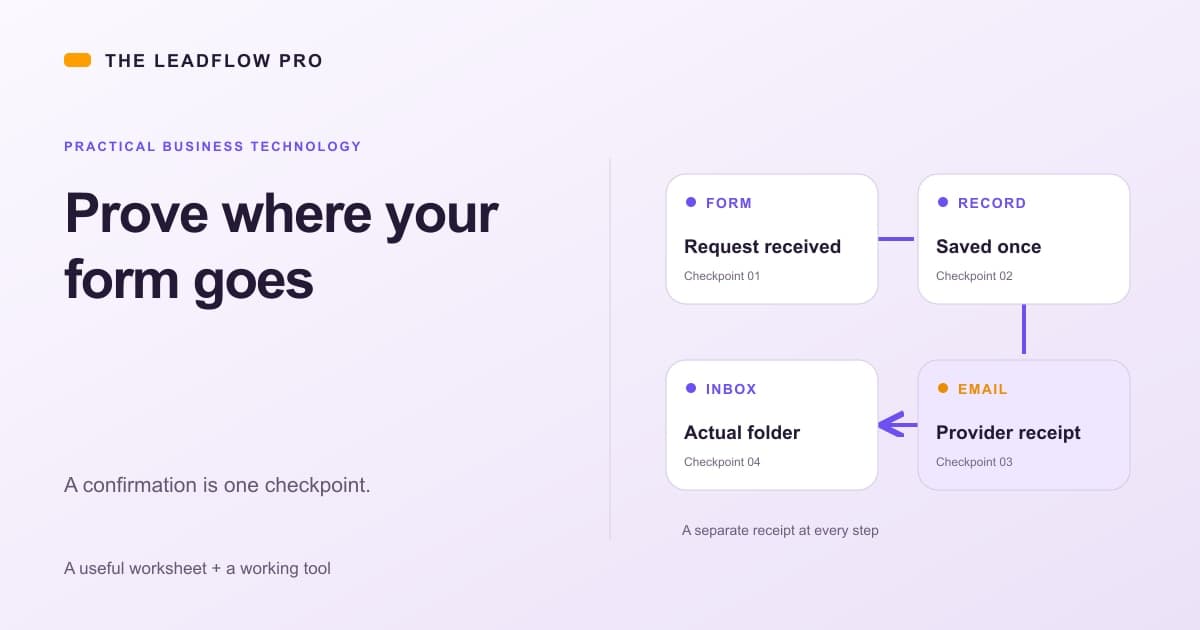
A green confirmation is the beginning of a form test, not the finish.
The useful question is whether one valid inquiry becomes one saved record, reaches the agreed business destination and leaves someone responsible for the next step.
You can check that path without replacing the website, buying another CRM or sending a pile of fake leads.
Give each stage its own proof
There are five different events to check:
- The browser received a clear response.
- The application saved the inquiry.
- The notification provider accepted the message.
- The receiving business mailbox placed it somewhere you can find.
- A named person has the next action.
Do not let one green status stand in for all five.
Resend explains that Delivered means the receiving server accepted the email. The receiving system can still put it in Spam or another folder. Checked November 1, 2026.
Read the definition behind the status in your actual provider. This distinction matters even when the website works perfectly.
Run one controlled test
Use a business-controlled test address and a harmless, unique marker such as FORM-QA-2026-11-01-A. Get the owner's approval before a test that sends email or creates staff work.
Use no customer information. Leave optional marketing and text-message boxes unchecked unless that particular path is explicitly part of the test.
Write down what you expect before pressing Send. Does this form create a lead, contact message or order? Who receives the alert? Does the visitor receive the requested result, an acknowledgement or nothing?
Then submit once. If the screen keeps saying Sending, do not immediately submit again. First check whether the record already exists. A slow notification can follow a successful save.
A worked example
This is an illustrative test for a fictional repair business, not a customer result.
The business expects a request to create one record, notify its office and acknowledge the visitor:
| Stage | Observation | What we know | |---|---|---| | Browser | Confirmation displayed | The application returned success | | Record | One row with the test marker | The request was saved once | | Owner alert | Provider says Delivered | The receiving server accepted it | | Office mailbox | Alert found in Spam | Staff Inbox placement failed for this message | | Visitor reply | Acknowledgement in test Inbox | This reply path worked | | Next action | No owner or due task recorded | Human handoff still needs a rule |
The website did not lose the record. The office alert still missed the place staff watch. Those are different repairs.
Correct a verified mailbox classification error through the mailbox's normal controls. Check authentication before changing security settings. Do not add a blanket allow rule or lift real complaints, bounces or opt-outs just to make a test green.
After a repair, a fresh authorized test can establish what happens to a new message. Moving an old message into Inbox does not establish future automatic placement.
Copy this acceptance sheet
Paste this into your existing operations notes. Keep identifiers private and omit passwords, tokens and real customer messages.
FORM ACCEPTANCE SHEET

Page and form:
Expected record type and business destination:
Authorized test address owner:
Unique test marker:
Expected visitor acknowledgement or requested item:
Expected staff owner and next action:

Observed once:
[ ] Clear browser success or useful error
[ ] Exactly one saved record matching the marker
[ ] Exact notification/provider receipt located
[ ] Actual receiving folder checked
[ ] Requested result or file actually present
[ ] Staff can find the inquiry and knows the next step
[ ] Optional marketing/SMS choices match the selection
[ ] Synthetic record excluded from ordinary lead reporting

If uncertain:
Do not resubmit until persistence and provider state are checked.
Record what is known, unknown and who resolves it.
This sheet is about acceptance, not traffic. Test the path before spending more to put people into it.
Ask how retries work
An internet timeout does not tell you whether the other system completed its operation.
Your builder should be able to explain how a retry avoids duplicate records and duplicate messages. The answer should name a stable identity, stored outcome and the actual provider's behavior.
Resend documents idempotency keys for repeat email requests, currently retained for 24 hours. That is a bounded provider feature, not permanent duplicate protection for your whole business process. Checked November 1, 2026.
Do not generate a new identity for every retry and call the result deduplicated. Also distinguish a notification retry from asking the visitor to complete the form again.
Keep failures visible
A quiet background retry can be useful. A quiet permanent failure is not.
Ask where staff can see saved requests whose alerts failed, who owns the exception and what stops repeated sends. Email webhooks can report delivery and bounce events; the application still has to store and act on the relevant result. Checked November 1, 2026.
A bounce does not justify trying an address forever. An opt-out does not disappear because a new workflow was installed.
Review the form itself before testing its handoff
Use this illustrative form-length model to compare questions you could remove. It does not test delivery or measure actual lost inquiries.
Your numbers
What that means
Based on your inputs and any starting examples. This calculation does not fetch live rates or market benchmarks.
Keep the information needed for the next step. Test a shorter form against real completed submissions; fewer fields do not guarantee more qualified leads.
Illustration only: each field beyond three retains 90% of the previous modeled completions, with a 15% floor. These are arbitrary, unvalidated assumptions, not measured abandonment or revenue loss.
What this assumed
- An arbitrary, unvalidated multiplicative completion curve compares form lengths. Count actual fields once; measure your own completions before drawing conclusions.
Calculations run in your browser. Choosing Email my result saves an excerpt and your contact details with The LeadFlow Pro so we can email it to you.
This is an estimate
This tool returns an estimate based on the numbers you entered. Your real result depends on your own costs, rates and conditions. Check it against your own records before you make a decision with it.
How to run it, step by step
- 1Count fields and actual form visits. Enter Fields on your form and People who reach the form each month. Use visits to this form, not every visitor to the website.
- 2Separate starts from successful saves. Percent who start filling it out is an assumption. A form start or button click is not a saved inquiry.
- 3Keep customer value and close rate hypothetical. Enter Value of a customer and Close rate only as planning inputs. The model cannot establish that a longer form lost these sales.
How to read what it gives you
- The output is an explicit scenario about form length. Confirm changes with actual saved-inquiry data.
- Removing a field does not fix a broken save, missed owner alert or Spam-folder placement.
- Keep essential routing questions, consent choices and accessible labels.
The tool is free, it does not expire, and you can put it on your own website if you want it there. Nothing on this page is locked.
Not ready to talk? Browse the rest of the free tools
Connect the repair to the business you already run
A practical LeadFlow project can start with your current website, agreed inbox and existing CRM. The scope is the missing connection and its acceptance test.
Our website service can include a scoped lead-capture path to an agreed inbox or CRM. If the problem is routing, ownership or follow-up, review the business automation service and request a specific plan.
Start with the page, intended destination and the last stage you can prove. That is enough to make the next conversation useful.
Questions people actually ask
Does a confirmation message prove the email arrived?
No. Check the saved record, provider receipt and receiving mailbox separately. A browser response is not evidence for all three.
Should I keep clicking Send if the form takes a while?
Check the destination before retrying. A slow response may follow a successful save. Safe retries use stable request identities rather than assuming the first attempt failed.
Can a delivered email still be in Spam?
Yes. Provider delivery means the receiving server accepted it. That system makes its own folder and filtering decisions.
Do I need a new CRM to test this?
No. Start with the current form, records and business mailbox. Replacement software is a separate decision.
Where these numbers come from
- Resend: Delivered is not Inbox placement (2026-11-01)
- Resend: idempotency keys and their retention window (2026-11-01)
- Resend: email event webhooks (2026-11-01)
Our own figures come from the lead records of businesses we run systems for, counted in total and never by name.