
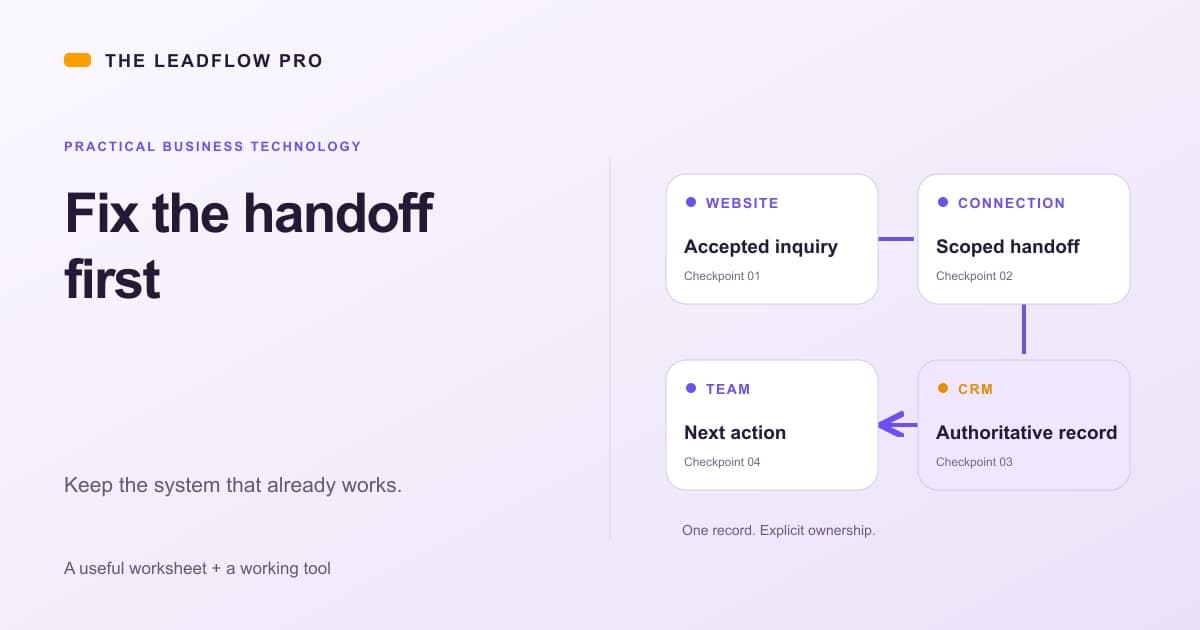
A business can have good software and still have a bad handoff.
The website collects a request. Someone copies it into a CRM. The estimate lives in another app. The office sends a reminder from memory.
Replacing all four systems may be a much larger job than fixing the step between them. Start by finding where information or responsibility stops moving.
Keep the record that already works
Choose one place that is authoritative for the thing you are handling.
For an inquiry, that might be the CRM. For an order, it might be the order system. A chat window or notification should not quietly become a second competing customer database.
Then name one input and one outcome. An accepted website request should create or update the right inquiry, preserve its source and leave the agreed person with a next action.
That is a buildable question. "Connect everything" is not a useful acceptance test.
Copy this handoff map
Use this with your team before authorizing another platform.
ONE HANDOFF MAP

Business problem:
What does the person do manually today?
Where does the work start?
Which system owns the final record?
Which exact fields must cross the boundary?
Which fields stay private or are excluded?
What stable ID identifies this request?
Who owns the next action?
What counts as a duplicate?
What happens when the destination is unavailable?
Where can staff see pending or failed work?
What event stops further follow-up?
Who can revoke the connection?
What proves it worked?
Fill in real system names privately. Do not include customer records or credentials in a public inquiry.
If the team disagrees about the final record or owner, settle that before writing the integration. Otherwise the software will move the disagreement faster.
A worked example: request to estimate queue
This is an illustrative design, not a customer deployment.
A service business already likes its estimating app. Its problem is that website requests arrive in email and get retyped before anyone prepares an estimate.
A limited connection could keep the submission ID, map the required fields and create a draft inquiry in that existing app. The office remains responsible for checking scope and sending the estimate.
| Field or decision | Source | Destination rule | |---|---|---| | Submission ID | Server-created request identity | Stored once and reused on a retry | | Contact details | Supported visitor fields | Only what is needed to respond | | Requested service | Known service choice | Mapped to the existing category | | Marketing preference | Explicit visitor choice | Preserved, never invented | | Owner | Agreed routing rule | Named role with an exception path | | Price and availability | Staff review | Not guessed from a request |
If the destination times out, staff need an honest pending state and a way to determine whether it already created the record. A timeout is not a safe instruction to make another copy.
The connection also needs a stop condition. A declined inquiry, completed job or opt-out should not keep receiving irrelevant follow-up because an old timer survived elsewhere.
Verify that the app permits the connection
Before buying a build, have the developer check the supported API or import method, available permissions and the account's current limits.
For example, HubSpot's developer guidance makes API limits dependent on the installed account's subscription and describes authentication requirements. Other vendors have different rules. A feature visible in an interface is not automatically available through its API. Checked November 1, 2026.
Ask for a small read-only test with harmless data before a write-capable trial. Confirm who owns the connection, how access is revoked and what happens when credentials expire.
An employee's unrestricted personal login creates a different risk from a scoped business-owned integration. Make that tradeoff visible.
Compare the costs with the actual work
Here is an illustration using the calculator below: five seats, $89 per seat each month, three tools at that same price, four planned hires and two unused seats.
The model shows $16,020 a year today and $28,836 after four hires. The two unused seats account for $6,408 of annual modeled cost across the three tools.
Those figures assume identical pricing and access. Real contracts may have minimums, annual commitments, bundled features or different people in each app. The unused-seat figure is not a guaranteed refund. Verify what can change before counting it as money saved.
Add the cost of the broken handoff: copying information, correcting mistakes and chasing failures. Measure a sample and avoid counting the same labor twice.
Compare that with a written connection scope covering implementation, operation, maintenance and exception handling. A low quote with no owner for failures is not a complete cost comparison.
Put the existing software bill beside the broken handoff
Use invoice prices for a seat-cost scenario. This model applies one price across every selected tool; run products separately when their contracts differ.
Your numbers
What that means
Based on your inputs and any starting examples. This calculation does not fetch live rates or market benchmarks.
The entered 2 unused seats account for $6,408 in modeled annual cost. Verify billing terms, ownership and required access before removing any seats.
What this assumed
- Assumes headcount grows at the rate you enter and every new person needs every tool.
Calculations run in your browser. Choosing Email my result saves an excerpt and your contact details with The LeadFlow Pro so we can email it to you.
This is an estimate
This tool returns an estimate based on the numbers you entered. Your real result depends on your own costs, rates and conditions. Check it against your own records before you make a decision with it.
How to run it, step by step
- 1Count paid access, not just employees. Enter Seats today and Price per seat per month from the current bill. Include access your operations actually require.
- 2Check the shared-price assumption. Number of per-seat tools you pay for multiplies the same price. Run different rates separately and add the results.
- 3Model growth and unused seats. Enter People you plan to add and Seats nobody uses anymore. Verify ownership, retention, integrations and billing terms before removing access.
How to read what it gives you
- The result is a cost scenario, not proof that software is overpriced or should be cancelled.
- Seat reduction is realizable only if the agreement permits it and the access is genuinely unnecessary.
- Compare build, operation and maintenance costs with the verified problem a connection would fix.
The tool is free, it does not expire, and you can put it on your own website if you want it there. Nothing on this page is locked.
Not ready to talk? Browse the rest of the free tools
Where a plugin or chat interface can help
A useful plugin can be a limited addition to systems the business already runs. It does not have to replace the CRM.
An API-backed service could let an approved interface request a record or prepare an action while the original system remains authoritative. MCP describes exposing tools and resources to compatible AI applications. It is a protocol, not evidence that a particular LeadFlow chat-app integration has shipped. Checked November 1, 2026.
For ChatGPT, Claude, Grok or another interface, verify current client support, sign-in requirements and exact operations before promising access. A planned capability belongs in a proposal until implemented and tested.
Start narrowly: show a selected inquiry's status, explain a missing field or prepare a draft. Keep sending, payments and permission changes separate.
Know when connecting is the wrong answer
An unsupported app, inaccessible records or missing required controls can make an integration fragile. Replacement may be the better decision, but it needs its own data, ownership, backup, permission and rollback plan.
Do not turn frustration with one handoff into an automatic migration. Also do not keep a failing platform forever because someone already paid for it.
Follow the evidence: what works, what breaks, what access exists and what it costs to preserve or change.
Start with the smallest useful addition
LeadFlow can be scoped around the business you already operate. Bring the handoff map, systems involved and the result you want to verify.
The business automation service is a starting point. Request a consultation for a plan before committing to a build.
A good first project has a clear starting record, one useful outcome and a person who can say whether it worked. Keep that checkable before expanding the connection.
Questions people actually ask
Can every business app be connected?
No. APIs, permissions, plans, limits and data quality vary. Verify the current product and account before promising a connection.
Does an integration remove the need for staff?
Not by itself. It can move information or prepare work, but ownership, exceptions, approvals and service decisions still need defined responsibility.
When should I replace the system instead?
Consider replacement when required access is unavailable, data cannot support the workflow, maintenance is not viable or a verified migration plan has lower total cost and risk.
Is a chat-app plugin the same as replacing my CRM?
No. An approved chat interface could call a scoped tool while the CRM remains authoritative. That design still needs supported connections, authentication, permissions and actual implementation.
Where these numbers come from
- HubSpot: API authentication, access and usage limits (2026-11-01)
- MCP: tools, resources and application roles (2026-11-01)
Our own figures come from the lead records of businesses we run systems for, counted in total and never by name.