
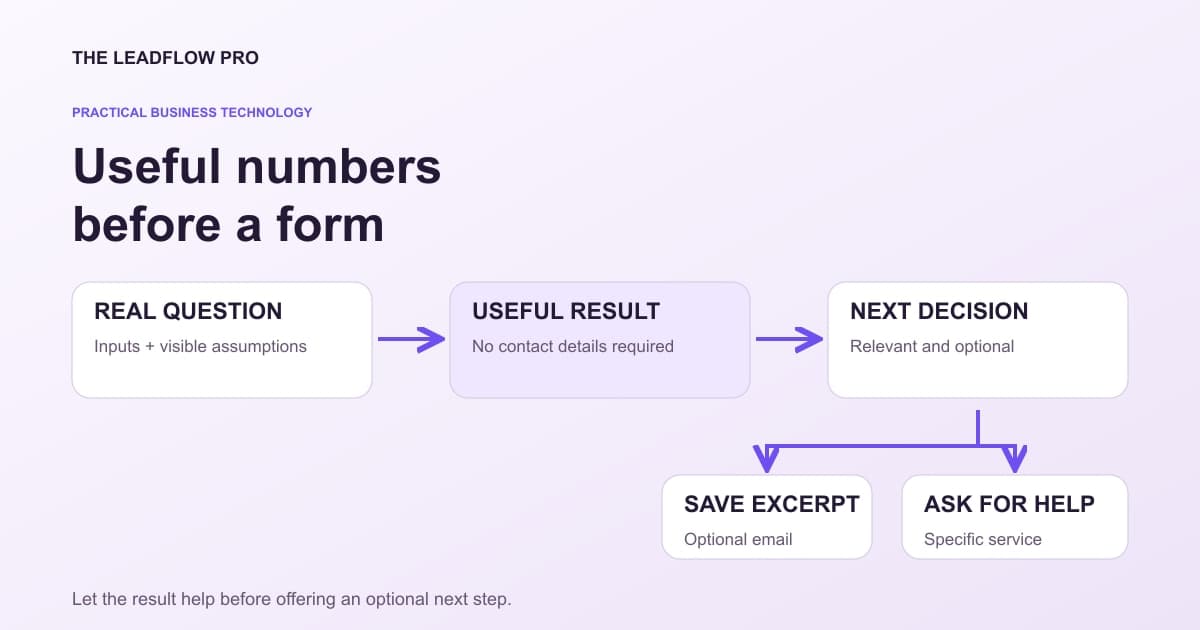
A visitor asks a practical question: "What would this cost?" or "How many jobs would make this worthwhile?"
A page that answers the question can earn the next click. A page that immediately demands a phone number asks for trust before providing much value.
An embedded calculator can help, provided its inputs, arithmetic and limitations are clear. The useful deliverable is a decision aid, not a decorative widget or a promise of automatic leads.
Choose one question with a real decision behind it
Start with the question a customer needs answered before contacting you. A planning range, break-even quantity or comparison may be useful. A complicated "business score" with unexplained weights may create confidence without understanding.
Write the decision in one sentence: "This helps an owner compare estimated gross contribution with a proposed acquisition cost." Then decide what the tool must not claim.
Keep the number of inputs tied to that decision. Ask for a price or quantity only if the calculation uses it. Do not collect a name, address or business record just because a template includes the field.
Google's content guidance asks whether a page adds original, substantial value for its intended audience. A calculator belongs when it helps answer the question; placing one on a page is not a ranking guarantee. Google's helpful-content guidance
Put the assumptions next to the answer
A model is only as useful as its definitions. "Lead value" could mean expected revenue, gross contribution, lifetime profit or the price someone wants you to pay for an inquiry.
Those are different numbers.
For an illustrative first-job-only example, assume a 20% close rate, a $500 average job and a 40% gross margin:
$500 × 40% = $200 gross contribution per customer.
$200 × 20% = $40 expected gross contribution per raw lead.
If acquisition costs $25 per raw lead, the modeled remainder is $15 before overhead and other unmodeled costs. That is not $15 net profit and not a prediction for each individual lead.
The calculator below also offers repeat and referral assumptions. Set those to zero to reproduce this example. Its 40% allocation produces $16 here, but that allocation is arbitrary, not an industry spending rule.
Try a calculator that makes the assumptions visible
Model gross contribution per raw lead. The example is a planning aid, not a promise about what an individual inquiry will earn.
Start from your industry
Editable starting examples for your industry. They change the starting numbers, not the math, and they are not industry statistics.
Your numbers
What that means
Based on your inputs and any starting examples. This calculation does not fetch live rates or market benchmarks.
The acquisition cost is below the illustrative allocation. Check cash timing, actual delivery costs, and observed customer behavior before increasing spending.
Scenario assumes every referred customer has the same first and repeat purchases. It excludes recursive referrals, overhead, refunds, timing, and discounting. The 40% allocation is arbitrary; average gross contribution is not cash available today.
What this assumed
- Lead value is gross profit per lead, not revenue per lead.
- Repeat purchases are counted at the same margin as the first sale.
Calculations run in your browser. Choosing Email my result saves an excerpt and your contact details with The LeadFlow Pro so we can email it to you.
This is an estimate
This tool returns an estimate based on the numbers you entered. Your real result depends on your own costs, rates and conditions. Check it against your own records before you make a decision with it.
How to run it, step by step
- 1Start without speculative lifetime gains. Enter Leads that turn into customers, Average first job and Gross margin from a consistent cohort. Set repeat jobs and referrals to zero for a first-job-only example.
- 2Compare costs with the right output. What you pay per lead now is an acquisition cost. Compare it with modeled gross contribution, while keeping overhead and cash timing separate.
- 3Treat allocation as a choice. The 40% allocation is arbitrary. It is neither a market benchmark nor a recommendation to increase spending.
How to read what it gives you
- Twenty percent close rate, a $500 job and 40% gross margin gives $40 expected gross contribution per raw lead before acquisition costs and overhead.
- Repeat and referral assumptions compound the model; they are not verified future purchases.
- Using the calculator does not require submitting the consultation form below.
The tool is free, it does not expire, and you can put it on your own website if you want it there. Nothing on this page is locked.
Not ready to talk? Browse the rest of the free tools
Design the next step around the result
A visitor who understands the number may want to copy it, compare another scenario, save an excerpt or ask for help applying it.
Offer a specific action that fits the question. "Review my acquisition-cost assumptions" tells the reader more than a generic "Submit."
Do not require a consultation to reveal the calculator's basic output. If an optional result-email action exists, explain that it saves the submitted inquiry and sends a result excerpt. Do not simultaneously promise that nothing is ever saved or sent.
An email request for a useful result is not permission for unrelated marketing or automated phone follow-up. Keep those choices distinct and describe what actually happens.
Use this calculator planning sheet
Copy the sheet before choosing the widget or building the form.
CALCULATOR BRIEF
Customer's question:
Decision this helps with:
Inputs and units:
Which defaults are illustrative:
Formula in plain language:
Output meaning:
What the output excludes:
Worked example checked by a person:
Zero, extreme and invalid input behavior:
Can the result be used without contact details?
Optional save/email action and exact content:
What that action stores and sends:
Relevant service or next step:
Mobile and keyboard acceptance checks:
Owner of future formula/copy changes:
A named owner matters. If pricing or business rules change, someone needs to check whether the calculator's examples and service links still make sense.
Test the actual embed, not only the standalone tool
LeadFlow tools have public standalone pages, and the eligible free tools provide embed code for a website. That does not establish that a particular website builder accepts every script or frame unchanged.
Try the actual embed in a safe preview. Check its width on a narrow phone, its result at larger text sizes and whether the frame height leaves controls visible.
MDN recommends a concise, descriptive title for an iframe so assistive-technology users can identify its contents. A generic label such as "widget" does little to explain the task. MDN iframe accessibility guidance
Keep a normal link to the standalone tool when appropriate. Test keyboard navigation and loading on the real host page, since the surrounding layout can change the experience.
Do not paste private information into a public URL or attach customer values to a tracking link.
Measure usefulness without calling every click a lead
Keep calculator visits, completed calculations, optional saved-result requests and qualified inquiries as separate events. A visitor can receive value without becoming a customer.
If you change the page, compare a consistent time window and traffic mix. A small increase after a release does not establish that the widget caused it.
The business question is whether the tool helps the right visitor understand the next decision and reach a working, relevant action.
Discuss a useful interactive page with LeadFlow. Bring the question, a checked example and the service the tool should support. A clear explanation and a dependable next step matter more than adding another box to the page.
Questions people actually ask
Should the result be locked behind an email form?
For this approach, let the visitor use the result first. Make saving or requesting help a clear optional action, with an accurate explanation of what is sent and stored.
Will embedding a calculator guarantee Google traffic?
No. It can help a person answer a real question, but publication, indexing, rankings and demand are separate matters.
Can I paste any calculator into any page?
Choose one that fits the customer's decision, confirm its assumptions and test the actual embed, mobile layout, loading and next-step links.
Where these numbers come from
- MDN: iframe accessibility and descriptive titles (2026-11-01)
- Google: original, helpful content for people (2026-11-01)
Our own figures come from the lead records of businesses we run systems for, counted in total and never by name.