
A website report says 100 leads. The sales team says 30 were useful. The owner remembers 12 sales.
All three numbers could be accurate. The report becomes misleading when they are given the same label or compared over different periods.
Start with a small set of stage definitions and a traceable cohort. You can do this in the current business system before buying another dashboard. The purpose is to find where the next decision belongs, not to manufacture an impressive conversion number.
Define a stage by evidence
A useful starting set is:
- Saved submission: the intended inquiry record exists.
- Eligible inquiry: it is a genuine request within the business's service scope, excluding documented tests, duplicates and obvious irrelevant submissions.
- Qualified inquiry: it meets the criteria your business has actually approved.
- Verified sale: there is the agreed commercial evidence, such as an accepted order or payment, with its status stated clearly.
An alert email is evidence of a notification. It is not evidence that staff replied or that a sale occurred.
A "new" label also does not prove no one followed up. Activity may be recorded elsewhere or the stage may not have been updated. Check receipts before judging the handoff.
Use a cohort, not a mixture of calendars
Choose the inquiries created in one defined period, then follow their outcomes through a stated observation date.
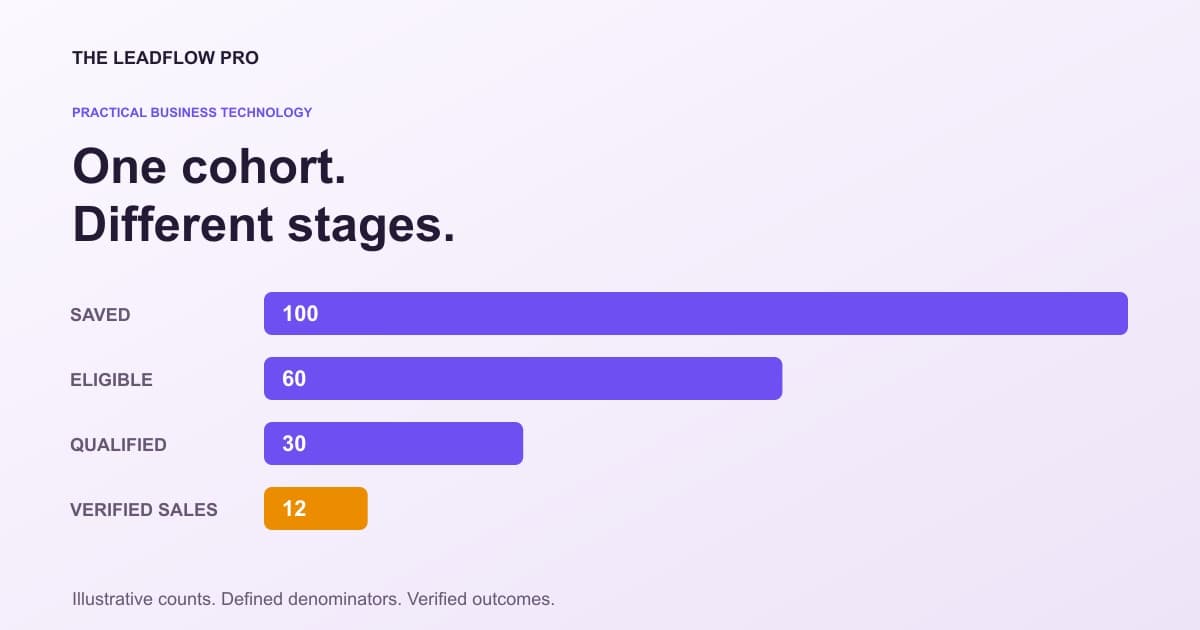
For an illustrative example, take 100 saved submissions from one month. After documented exclusions, 60 are eligible, 30 are qualified and 12 become verified sales by the observation date.
One illustrative cohort, four different stages
Fictional numbers for teaching. These are not LeadFlow or client results.
| Item | Value |
|---|---|
| Saved submissions | 100 |
| Eligible inquiries | 60 |
| Qualified inquiries | 30 |
| Verified sales | 12 |
Illustrative arithmetic only. Source: Illustrative cohort defined in this article; one record per inquiry and one verified outcome per sale.
The qualification rate is 30 ÷ 60 = 50% of eligible inquiries.
The qualified-to-sale rate is 12 ÷ 30 = 40%.
The raw-submission-to-sale rate is 12 ÷ 100 = 12%.
Those percentages answer different questions. None should be displayed simply as "conversion rate" without its denominator.
Recent inquiries have had less time to close. Comparing this week's immature cohort with last month's fully observed cohort can make a healthy process look worse. Show the cohort period, observation cutoff and unresolved count.
Use this stage and ownership worksheet
Copy one section per stage. Keep customer identities and freeform messages inside the authorized business record system, not in a public planning document.
COHORT
Inquiry-created date range:
Observation cutoff:
Time zone:
Included sources:
Test, duplicate and irrelevant-request rules:
Unresolved outcomes:

STAGE DEFINITION
Stage:
Exact entry criteria:
Record or receipt proving entry:
Who can confirm it:
Timestamp meaning:
Next owner and next action:
Due-date rule, if one already exists:
Reversal/correction rule:
How the change is audited:

RECONCILIATION
Saved submissions:
Documented exclusions:
Eligible:
Qualified:
Won with verified evidence:
Lost with recorded reason:
Still unresolved:
Unlinked sales or missing inquiry references:
Do not invent a salesperson, deadline or automated follow-up because a field is empty. Name the unresolved ownership and agree a process before creating tasks or messages.
Keep one event from becoming several wins
A person may submit twice, reply by email and buy later. Decide how those interactions relate to one inquiry and one commercial outcome.
Keep source evidence. Do not delete a duplicate record merely to improve the totals; record the linkage and exclusion rule so someone can reproduce the count.
Reopened opportunities and refunded orders also need explicit treatment. A sale moving between stages should not create a second customer unless your definition actually counts a separate purchase.
For businesses already using Google Analytics, its recommended vocabulary distinguishes generate_lead, qualify_lead, working_lead and close_convert_lead. Those events require implementation context; their presence in documentation does not mean your website sends them correctly or automatically. Google's recommended lead events
You do not need to add that platform to use the underlying distinctions in your existing records.
Connect the sales count to the right money number
Suppose each of the 12 illustrative sales is $100 and includes $60 of direct cost. That gives $1,200 revenue and $480 gross contribution.
If acquisition spending for the cohort was $300, the remainder is $180 before overhead and any other excluded costs. It is not $1,200 profit and not necessarily $180 cash available today.
The calculator below reproduces the $40 per-sale and $480 monthly gross figures when units are set to 12. The money example assumes one sale per won inquiry. If your customers buy multiple items or pay in stages, model those records explicitly.
Translate verified sales into gross contribution
Use the tool for a clearly defined price and included cost. Its monthly profit label is gross contribution from those inputs, before costs you have not entered.
Start from your industry
Editable starting examples for your industry. They change the starting numbers, not the math, and they are not industry statistics.
Your numbers
What that means
Based on your inputs and any starting examples. This calculation does not fetch live rates or market benchmarks.
If the target price is higher, moving to $120.00 models $800 additional gross contribution per month at unchanged volume and entered cost. Demand, overhead and other costs are not modeled.
What this assumed
- Cost means the direct cost of delivering that unit, not your whole overhead.
Calculations run in your browser. Choosing Email my result saves an excerpt and your contact details with The LeadFlow Pro so we can email it to you.
This is an estimate
This tool returns an estimate based on the numbers you entered. Your real result depends on your own costs, rates and conditions. Check it against your own records before you make a decision with it.
How to run it, step by step
- 1Define the cost basis. Enter What it costs you and What you charge for the same unit. Decide which direct costs are included and do not silently treat missing costs as zero.
- 2Enter observed sales, not submissions. How many you sell a month should describe completed sales in the period you are modeling. An inquiry is not a sold unit.
- 3Keep target pricing hypothetical. Margin you want calculates a price scenario. Changing a price can affect demand, volume and delivery costs.
How to read what it gives you
- A $100 sale with $60 included cost gives $40 gross contribution, or 40% gross margin.
- Twelve such sales produce $480 before acquisition spending, overhead and other excluded costs.
- Payment, booked revenue, refunds and cash collected may have different dates. Define which outcome your report uses.
The tool is free, it does not expire, and you can put it on your own website if you want it there. Nothing on this page is locked.
Not ready to talk? Browse the rest of the free tools
Keep private records out of the reporting plumbing
Use the business's protected record system for identity matching and detailed activity. A general analytics event should not contain a name, email address or pasted inquiry body.
Google's guidance also covers personally identifiable information leaking through page URLs and titles. Keep contact details out of tracking-link parameters rather than relying on a later cleanup. Google Analytics privacy guidance
Choose aggregate reports and access controls that fit the job. A report for marketing does not automatically need every customer's message.
Investigate the first missing proof
If records save but no owner receipt exists, examine notification and assignment. If qualified inquiries receive replies but do not buy, review the offer and commercial process. If sales exist without linked inquiries, fix attribution before judging a source.
Discuss a measurable handoff with LeadFlow. Bring the stage sheet and the specific missing evidence. Any new sales tracking, assignment or follow-up behavior needs to be implemented and verified in your system; a dashboard label alone does not establish that it already happens.
Questions people actually ask
Is a form submission a qualified lead?
Only if it meets your documented qualification criteria and you have evidence for that stage. Saved submission and qualification should have separate definitions.
Does a stage marked new mean nobody followed up?
No. The stage may be stale or staff activity may live elsewhere. Check actual activity receipts before making that claim.
Can I send names and inquiry bodies to analytics to match sales?
Do not use general analytics events or URLs as a customer-record store. Google Analytics specifically prohibits sending data it recognizes as personally identifiable information.
Where these numbers come from
- Google Analytics: recommended lead-generation event meanings (2026-11-01)
- Google Analytics: keep PII out of events, URLs and titles (2026-11-01)
Our own figures come from the lead records of businesses we run systems for, counted in total and never by name.